API Reference
Modality REST API
The Modality API follows REST conventions. All first-party endpoints are versioned under /api/v1/ and return JSON. The REST surface is authenticated with your Auth.js session cookie, it is designed for the Modality web app and mobile app. Programmatic mk_live_ API keys authenticate a separate surface: the Model Context Protocol (MCP) server at POST /api/mcp.
workspaceId you pass in. Any client-supplied workspaceId in a query string or body is ignored and overwritten. This is the tenant-isolation guarantee that prevents cross-workspace access (IDOR).Authentication
There are two distinct auth boundaries. Choose the one that matches your caller, they are not interchangeable.
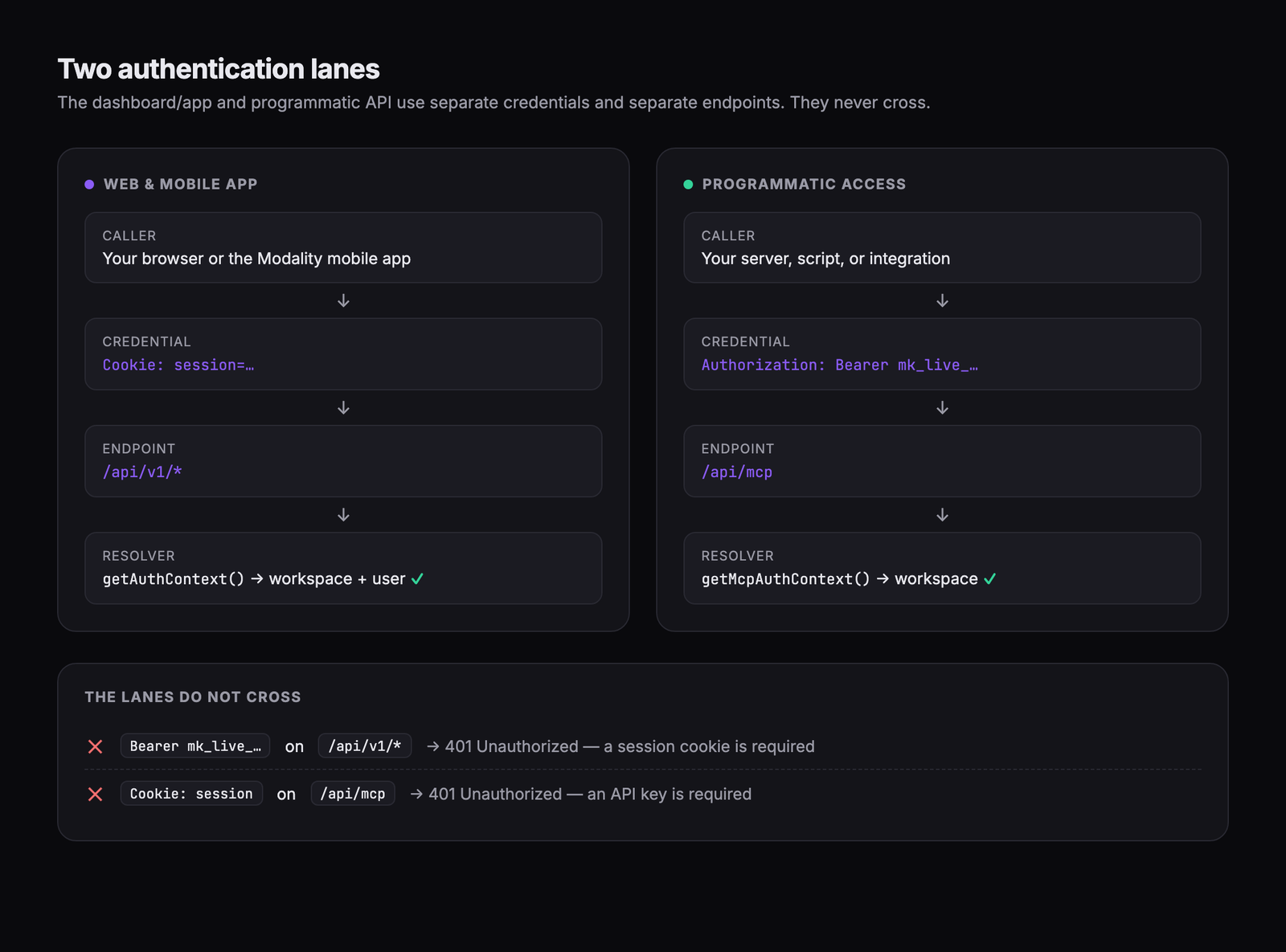
1. Session cookies, the REST surface (/api/v1/*)
Modality uses Auth.js (NextAuth v5) with a JWT session strategy. When you sign in, the browser (or the mobile app) receives a session cookie that is sent automatically with every request. Server code resolves it with getAuthContext(), which returns the caller's workspaceId, userId, and workspace role. There is currently no Bearer-token authentication on the /api/v1 surface, sending an Authorization header there does nothing, and an unauthenticated request returns 401 { "error": "Not authenticated" }.
/api/v1/… from a server-to-server script with a Authorization: Bearer header, those routes never read it, so the call is treated as unauthenticated and returns 401. For programmatic access, use the MCP server (below).2. API keys, the MCP surface (/api/mcp)
For machine callers (agents, scripts, integrations) Modality issues workspace API keys in the format mk_live_<random>. A key authenticates only the MCP server at POST /api/mcp, where getMcpAuthContext() resolves the key to its owning workspace. The key is hashed (SHA-256) at rest; the plaintext is shown to you exactly once at creation.
Calling the MCP server
curl -X POST https://modalitystudio.com/api/mcp \
  -H "Authorization: Bearer mk_live_xxxxxxxxxxxxxxxxxxxx" \
  -H "Content-Type: application/json" \
  -d '{ "jsonrpc": "2.0", "id": 1, "method": "tools/list" }'
The MCP server speaks JSON-RPC 2.0 (Streamable-HTTP). Use tools/list to discover tools and tools/call to invoke one. See the MCP / AI access section for details.
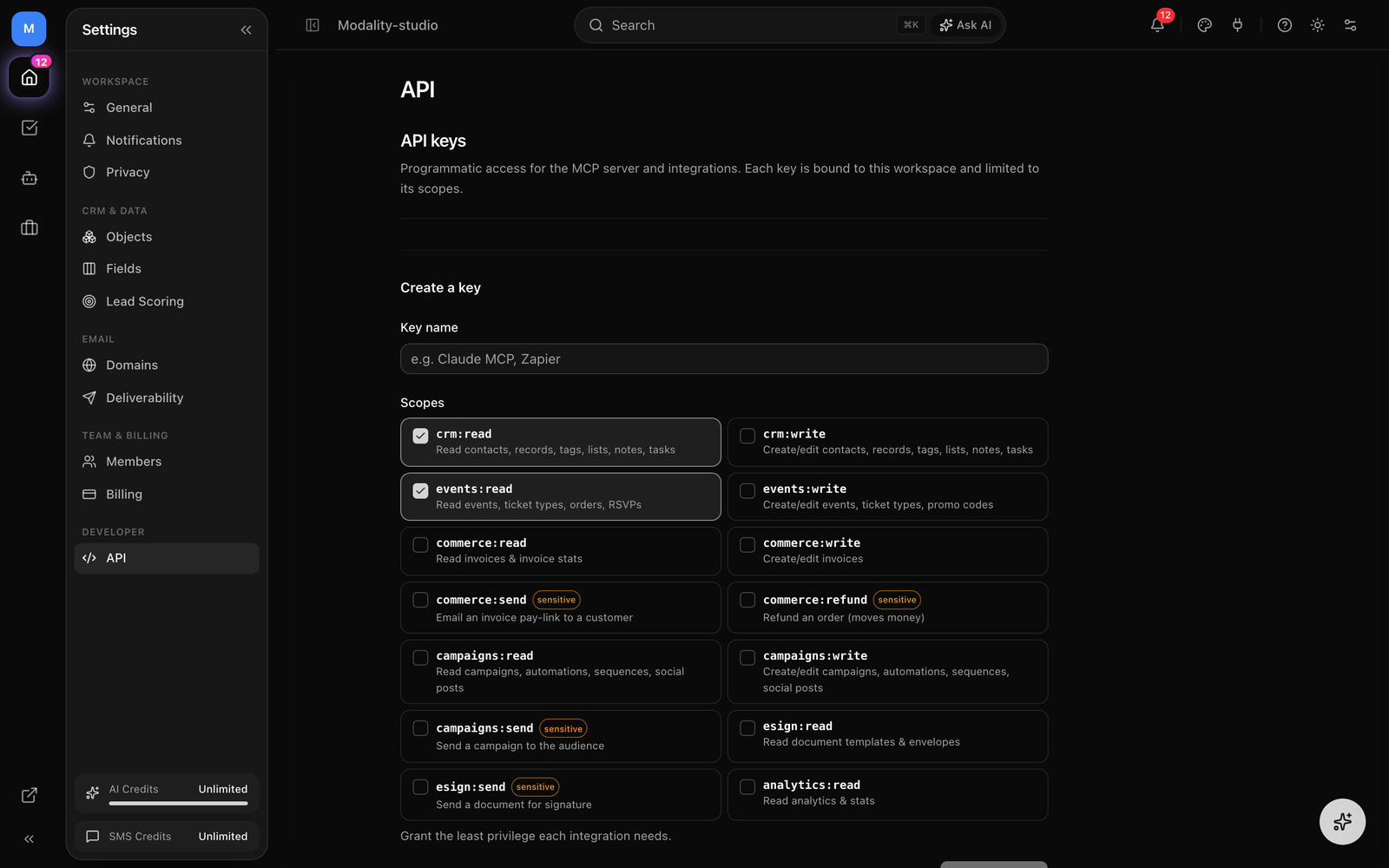
- Open Settings → API (requires the Business plan, the tab is gated behind the
api_accessfeature). - Only workspace Owners/Admins can issue keys (
workspace:managepermission). - Give the key a name and select its scopes (least-privilege, see below). Keys are scope-limited, not full-access.
- Copy the
mk_live_…secret immediately, it is displayed once and cannot be retrieved again.
Authorization & Permissions
Being authenticated is not enough, every mutating route also checks a role permission via requirePermission(role, '<resource>:<action>'). Permissions follow a resource:action shape, e.g. contacts:read, contacts:write, events:read, events:write, invoices:write, integrations:write, analytics:read. Some routes (e.g. creating a custom object type) require Owner/Admin via requireAdmin(role).
401{ "error": "Not authenticated" }, no valid session.403{ "error": "Forbidden: requires contacts:write permission" }, session is valid but the role lacks the permission.403with a plan-limit payload, the workspace hit a plan cap (see Errors). Enforced byenforcePlanLimit().
Response Format
Envelope Shapes
// Single item
{ "data": { "id": "...", ... } }

// List (with a total count)
{ "data": [ ... ], "total": 42 }

// Create, returns 201 with the created resource
{ "data": { "id": "...", ... } }{ data, total }, but not all are uniform. GET /api/v1/objects returns { data } with no total, and GET /api/v1/events sets total to the number of items returned (the page length), not a separate full count. Treat total as authoritative only where a resource is paginated.Errors
Errors use standard HTTP status codes and one of the following JSON bodies:
Error Bodies
// 400, Zod validation failure (details is the list of issues)
{ "error": "Invalid input", "details": [ { "path": ["email"], "message": "Required" } ] }

// 401, not signed in
{ "error": "Not authenticated" }

// 403, role lacks the permission
{ "error": "Forbidden: requires events:write permission" }

// 403, plan cap reached (shape varies by limit)
{ "error": "You've reached your plan's contact limit", "limit": 500, "current": 500, "upgradeUrl": "..." }

// 404, not found / not owned by this workspace
{ "error": "Event not found" }

// 409, conflict (e.g. deleting a ticket type that has sold tickets)
{ "error": "This ticket type has sold tickets, so it can't be deleted..." }

// 429, rate limited
{ "error": "Too many requests" }

// 500, unexpected server error
{ "error": "Failed to fetch contacts" }details (the raw Zod issues array) alongside error. Some routes use parsed.error.flatten() instead of the issues array, so details may be either a flat list or a { fieldErrors, formErrors } object, read it, don't assume its exact shape.Contacts (People)
Manage CRM contacts with tags, lists, custom statuses, custom fields, and activity timelines. Contacts are the same records surfaced as "People" in the app. Permissions: contacts:read / contacts:write.
/api/v1/contactsSession AuthList contacts in the workspace. All filters are optional; the workspace is taken from the session (never a query param).
Query Parameters
searchstringMatch by name or emailtagIdstring (repeatable)Include contacts with this tag; repeat for multipleexcludeTagIdstring (repeatable)Exclude contacts with this taglistIdstring (repeatable)Include contacts in this listexcludeListIdstring (repeatable)Exclude contacts in this liststatusstringFilter by lifecycle statusexcludeStatusstringExclude a lifecycle statuscustomStatusstringFilter by a workspace-defined custom statussortBystringSort field (default: createdAt)sortDirectionasc|descSort direction (default: desc)pagenumberPage number (default: 1)pageSizenumberItems per page (default: 50)Response
{
  "data": [
    {
      "id": "clx...",
      "email": "user@example.com",
      "firstName": "Jane",
      "lastName": "Doe",
      "phone": null,
      "source": "form",
      "status": "ACTIVE",
      "tags": [{ "id": "...", "name": "VIP", "slug": "vip" }],
      "createdAt": "2026-01-15T10:30:00Z"
    }
  ],
  "total": 1842
}/api/v1/contactsSession AuthCreate a contact, or upsert by email. If a contact with the same email already exists, the new fields are merged onto the living record instead of erroring. Returns 201.
Request Body (JSON)
emailstringrequiredContact email address (identity key)firstNamestringFirst namelastNamestringLast namephonestringPhone number (normalized to E.164 on write)sourcestringLead source identifiertagIdsstring[]Tag IDs to attachResponse
{ "data": { "id": "clx...", "email": "user@example.com", ... } }/api/v1/contacts/:idSession AuthGet a single contact with tags, lists, custom statuses, and custom field values.
/api/v1/contacts/:idSession AuthUpdate a contact's fields, tags, lists, and status.
/api/v1/contacts/:idSession AuthDelete a contact from the workspace.
/api/v1/contacts/:id/timelineSession AuthGet the contact's activity timeline (form submissions, orders, campaign engagement, notes).
/api/v1/contacts/importSession AuthBulk upsert contacts. Each row is created or merged by email. Subject to the workspace's plan contact limit.
Request Body (JSON)
contactsobject[]requiredArray of mapped contact objectsResponse
{
  "results": [ { "email": "a@x.com", "status": "created" }, ... ],
  "summary": { "created": 150, "updated": 23, "errors": 2 }
}{ results, summary }, the per-row outcomes plus a summary of { created, updated, errors }. There is no data wrapper and no imported field. Tags are not applied by this endpoint; attach tags per-contact or via a follow-up call.Related CRM helpers:
GET /api/v1/contacts/fields | List the custom-field schema available on contacts |
POST /api/v1/contacts/import/suggest-mapping | AI-suggested column → field mapping for a CSV header row |
Lists, Segments, Tags & Fields
Segmentation lives in Modality (ESPs are only delivery destinations). Tags are simple labels; lists are static memberships; segments are saved rule sets that resolve to a live audience.
GET/POST /api/v1/tags | List / create tags |
GET/PATCH/DELETE /api/v1/tags/:id | Read, rename, or delete a tag |
GET/POST /api/v1/lists | List / create static lists |
GET/PATCH/DELETE /api/v1/lists/:id | Manage a list |
GET/POST /api/v1/crm-lists | Richer CRM lists (with saved views + entries) |
GET/POST /api/v1/crm-lists/:id/entries | Add or list entries in a CRM list |
GET/POST /api/v1/crm-lists/:id/views | Saved views for a CRM list |
GET/POST /api/v1/segments | List / create rule-based segments |
GET/PATCH/DELETE /api/v1/segments/:id | Manage a segment |
GET /api/v1/segments/count | Resolve a segment rule to a live audience count |
GET/POST /api/v1/custom-fields | Define custom contact fields |
GET/PATCH/DELETE /api/v1/custom-fields/:id | Manage a custom field |
GET/POST /api/v1/contact-statuses | Workspace-defined lifecycle statuses |
GET/POST /api/v1/merge-tags | Merge tags usable in campaigns/templates |
GET/POST /api/v1/email-templates | Reusable email templates |
GET/POST /api/v1/tasks | CRM tasks; /tasks/:id to manage |
GET/POST /api/v1/notes | Notes; /notes/:id to manage |
Events
Create and manage events, ticket types, RSVPs, orders, promo codes, and door operations. Permissions: events:read / events:write.
/api/v1/eventsSession AuthList events in the workspace.
Response
{
  "data": [
    {
      "id": "clx...",
      "title": "Summer Festival",
      "slug": "summer-festival",
      "status": "PUBLISHED",
      "visibility": "PUBLIC",
      "startsAt": "2026-07-15T18:00:00Z",
      "endsAt": "2026-07-15T23:00:00Z",
      "venue": "Outdoor Arena",
      "ticketTypes": [
        { "id": "...", "name": "GA", "price": 4500, "capacity": 2000 }
      ]
    }
  ],
  "total": 5  // count of items returned, not a paginated total
}/api/v1/eventsSession AuthCreate an event. A slug is derived from the title if you don't supply one. Subject to the plan event limit.
Request Body (JSON)
titlestringrequiredEvent titleslugstringURL slug (auto-derived from title if omitted)descriptionstringEvent descriptionstartsAtISO 8601Start date/timeendsAtISO 8601End date/timetimezonestringIANA timezonevenuestringVenue nameaddressstringVenue addresscoverImagestringCover image URLstatusenumDRAFT | PUBLISHED | COMPLETED | CANCELLEDvisibilityenumPUBLIC | SEARCHABLE | UNLISTED | PRIVATEcapacitynumberOverall capacityrequireApprovalbooleanGate RSVP/checkout behind host approvallat / lngnumberCoordinates (used for mobile Discovery)Response
{ "data": { "id": "clx...", "slug": "summer-festival", ... } }/api/v1/events/:idSession AuthGet a single event with its ticket types and settings.
/api/v1/events/:idSession AuthUpdate event fields (partial). Same field set as create, minus workspaceId.
/api/v1/events/:idSession AuthDelete an event.
Ticket types
/api/v1/events/:id/ticket-typesSession AuthAdd a ticket type. Prices are integers in cents. Returns 404 if the event isn't in your workspace.
Request Body (JSON)
namestringrequiredTier name (e.g. GA, VIP)pricenumberrequiredPrice in cents (4500 = $45.00)capacitynumberMax tickets for this tiersalesStartISO 8601When this tier goes on salesalesEndISO 8601When sales close for this tierdescriptionstring (≤200)Short blurb shown under the tier nameoccurrenceIdsstring[]Showings this tier sells at (empty = all showings)requiredbooleanRequired base tier, cart keeps its qty ≥ total add-ons/api/v1/events/:id/ticket-typesSession AuthUpdate a ticket type (pass ticketTypeId in the body). Adds a status field: ACTIVE | PAUSED | SOLD_OUT | CLOSED.
Request Body (JSON)
ticketTypeIdstringrequiredThe tier to updatestatusenumACTIVE | PAUSED | SOLD_OUT | CLOSED…variousAny create field (name, price, capacity, salesStart/End, etc.)/api/v1/events/:id/ticket-typesSession AuthDelete a ticket type (ticketTypeId in body). Returns 409 if it has sold tickets, set status to CLOSED instead to remove it from sale without breaking order history.
/api/v1/events/:id/ticket-types/reorderSession AuthReorder the tiers as they appear on the public page (drag-reorder).
Checkout
/api/v1/events/:id/checkoutPublicCreate a Stripe checkout for a ticket purchase. Public, no session required; rate-limited by client IP. If the event has requireApproval enabled, checkout returns 403 until the RSVP is approved.
Request Body (JSON)
emailstringrequiredBuyer emailfirstNamestringBuyer first namelastNamestringBuyer last nameitemsarrayrequired[ { ticketTypeId, quantity } ]promoCodestringOptional promo codeResponse
{
  "data": {
    "checkoutUrl": "https://checkout.stripe.com/...",   // hosted redirect
    "clientSecret": "cs_...",                             // when using Embedded Checkout
    "orderId": "clx..."
  }
}RSVPs, orders & door operations
A large surface of event sub-resources ships today. The canonical "attending" predicate for an RSVP is approved: true and declinedAt: null.
GET/POST /api/v1/events/:id/rsvps | List RSVPs / create one; :id/rsvps/:rsvpId to manage |
POST /api/v1/events/:id/rsvp | Public RSVP submission (approval-gated when enabled) |
GET /api/v1/rsvps/pending | RSVPs awaiting host approval across events |
GET/POST /api/v1/events/:id/orders | Orders for the event |
POST /api/v1/events/:id/orders/:orderId/refund | Refund an order (Connect) |
GET/POST /api/v1/events/:id/promo-codes | Manage promo codes |
POST /api/v1/events/:id/promo-codes/validate | Public: validate a promo code |
GET/POST /api/v1/events/:id/waitlist | Waitlist; :id/waitlist/manage to admit |
GET /api/v1/events/:id/occurrences | Recurring-showing occurrences |
GET/POST /api/v1/events/:id/seats | Seating map; /seats/initialize to build it |
POST /api/v1/events/:id/duplicate | Duplicate an event |
POST /api/v1/events/:id/invite | Send invitations |
GET /api/v1/events/:id/qr | Event QR code |
GET /api/v1/events/:id/checkin/manifest | Door check-in manifest |
POST /api/v1/events/:id/send-email | Email attendees |
POST /api/v1/events/:id/sms-blast | SMS blast to opted-in attendees |
GET /api/v1/events/by-slug?slug=… | Resolve an event by slug |
Point of sale (door)
GET /api/v1/events/:id/pos/config | POS configuration for the event |
POST /api/v1/events/:id/pos/payment-intent | Create a PaymentIntent (Tap to Pay / reader) |
POST /api/v1/events/:id/pos/card-payment-intent | Manual card key-in PaymentIntent |
POST /api/v1/events/:id/pos/sale | Finalize a door sale into an order |
POST /api/v1/events/:id/pos/receipt | Issue a receipt |
Tickets & Orders
Read issued tickets and orders, look up a ticket for check-in, and generate wallet passes.
GET /api/v1/tickets | List issued tickets |
GET /api/v1/tickets/lookup | Look up a ticket (e.g. by code) for check-in |
GET /api/v1/tickets/:id/wallet | Apple Wallet pass (.pkpass) |
GET /api/v1/tickets/:id/google-wallet | Google Wallet pass link |
GET /api/v1/orders | List orders across events |
GET/POST /api/v1/reservations | Space/time reservations |
POST /api/v1/checkin/redeem | Redeem a ticket (idempotent on clientScanId) |
POST /api/v1/checkin/rsvp | Check in an approved RSVP guest |
POST /api/v1/checkin/undo | Undo a check-in |
GET /api/v1/checkin/stats | Live door counts |
/api/v1/staff/:token/* (manifest, redeem, rsvp-decision, stats, undo). These are token-scoped to one event and its check-in tools, so you can hand a scanner to a volunteer without adding them to the workspace.Forms & Submissions
Build dynamic forms (multi-page, conditional logic, theming, payment) and collect submissions. Submitting a form upserts a Person and stores the submission.
/api/v1/formsSession AuthList forms in the workspace.
/api/v1/formsSession AuthCreate a form.
Request Body (JSON)
namestringrequiredForm namefieldsFormField[]Field definitionssettingsobjectTheme, payment, notifications, etc.statusstringDRAFT or PUBLISHED/api/v1/forms/:idSession AuthGet a single form.
/api/v1/forms/:idSession AuthUpdate a form.
/api/v1/forms/:idSession AuthDelete a form.
/api/v1/submissions/:slugPublicSubmit a form. Public. Upserts a Person by email and stores the submission; may return a payment URL for priced forms.
Request Body (JSON)
(dynamic)objectrequiredField values keyed by field IDResponse
{
  "data": {
    "id": "clx...",
    "formId": "clx...",
    "contactId": "clx...",
    "paymentUrl": "https://..."   // priced forms only
  }
}
Form sub-resources:
GET /api/v1/forms/:id/submissions | List a form’s submissions |
GET/POST /api/v1/forms/:id/variants | Product-set / scheduler variants |
GET/PATCH/DELETE /api/v1/forms/:id/variants/:variantId | Manage a variant |
POST /api/v1/forms/:id/variants/:variantId/duplicate | Duplicate a variant |
GET /api/v1/forms/:id/orders-report | Orders/payments report for a priced form |
GET /api/v1/forms/resolve | Resolve a public form (by slug/variant) |
POST /api/v1/forms/verify | Email-confirmation verification |
GET /api/v1/submissions/detail/:id | Full submission detail |
POST /api/v1/submissions/:slug/upload | File upload field handler |
POST /api/v1/submissions/send-payment-link/:id | Send a payment link for a submission |
Campaigns
Create and send email campaigns. Delivery goes through an ESP connector, or (where enabled) native sending. Permissions: campaigns:read / campaigns:write.
/api/v1/campaignsSession AuthList campaigns.
/api/v1/campaignsSession AuthCreate a campaign.
Request Body (JSON)
namestringrequiredCampaign namesubjectstringrequiredSubject linehtmlContentstringHTML bodytextContentstringPlain-text fallbackaudienceTypestringALL, TAG, LIST, or SEGMENTaudienceValuestringTag slug / list ID / segment IDconnectorIdstringESP connector for delivery/api/v1/campaigns/:idSession AuthGet a campaign.
/api/v1/campaigns/:idSession AuthUpdate a campaign.
/api/v1/campaigns/:idSession AuthDelete a campaign.
/api/v1/campaigns/:id/sendSession AuthSend now or schedule (pass scheduledFor to defer).
Request Body (JSON)
scheduledForISO 8601Schedule time (omit for immediate send)Campaign tooling:
GET /api/v1/campaigns/:id/stats | Delivery/open/click analytics |
POST /api/v1/campaigns/:id/test | Send a test email |
POST /api/v1/campaigns/:id/preflight | Pre-send checks (links, merge tags, audience) |
POST /api/v1/campaigns/:id/duplicate | Duplicate a campaign |
POST /api/v1/campaigns/render | Render HTML (per-section parity for the editor) |
POST /api/v1/campaigns/generate | AI-generate campaign content |
POST /api/v1/campaigns/decompose | Decompose HTML into editable sections |
GET /api/v1/campaigns/:id/template-content | Fetch template content for the editor |
Sequences
Multi-step drip sequences with enrollments. Permissions reuse the automations set: automations:read / automations:write. A cron worker advances enrollments.
GET/POST /api/v1/sequences | List / create sequences |
GET/PATCH/DELETE /api/v1/sequences/:id | Manage a sequence |
GET/POST /api/v1/sequences/:id/steps | List / add steps |
GET/PATCH/DELETE /api/v1/sequences/:id/steps/:stepId | Manage a step |
POST /api/v1/sequences/:id/enroll | Enroll a contact |
GET /api/v1/sequences/:id/enrollments | List enrollments |
GET/PATCH/DELETE /api/v1/sequences/:id/enrollments/:enrollmentId | Manage an enrollment |
Automations
Trigger → action workflow rules. Permissions: automations:read / automations:write.
/api/v1/automationsSession AuthList automations.
/api/v1/automationsSession AuthCreate an automation.
Request Body (JSON)
namestringrequiredAutomation nametriggerobjectrequired{ type, config }, trigger definitionactionsobject[]requiredArray of { type, config } stepsstatusstringACTIVE or PAUSED (default: ACTIVE)/api/v1/automations/:idSession AuthGet an automation.
/api/v1/automations/:idSession AuthUpdate an automation.
/api/v1/automations/:idSession AuthDelete an automation.
/api/v1/automations/:id/logsSession AuthExecution log for an automation.
Custom Objects
Define custom data structures (Deals, Sponsors, …) with typed attributes and records. Permissions: objects:read for reads; creating an object type requires Owner/Admin.
/api/v1/objectsSession AuthList object types. NOTE: returns { data } with no total.
Response
{
  "data": [
    {
      "id": "clx...",
      "name": "Deals",
      "slug": "deals",
      "singularName": "Deal",
      "icon": "Briefcase",
      "attributes": [
        { "name": "Stage", "type": "select", "options": [...] },
        { "name": "Value", "type": "currency" }
      ]
    }
  ]
}/api/v1/objectsSession AuthCreate an object type (Owner/Admin only).
Request Body (JSON)
namestringrequiredPlural name (e.g. Deals)slugstringrequiredURL-safe identifiersingularNamestringSingular form (e.g. Deal)iconstringLucide icon name/api/v1/objects/:slugSession AuthGet one object type.
/api/v1/objects/:slugSession AuthUpdate an object type.
/api/v1/objects/:slugSession AuthDelete an object type.
/api/v1/objects/:slug/recordsSession AuthList records with sorting, filtering, and full-text search.
Query Parameters
pagenumberPage numberpageSizenumberItems per pagesortBystringAttribute to sort bysortDirasc|descSort directionsearchstringFull-text search across attributes/api/v1/objects/:slug/recordsSession AuthCreate a record.
Request Body (JSON)
titlestringrequiredRecord titleattributesobjectKey-value pairs for custom attributesObject sub-resources:
GET/POST /api/v1/objects/:slug/attributes | Manage the object’s attribute schema |
PATCH/DELETE /api/v1/objects/:slug/attributes/:id | Edit / remove an attribute |
GET/PATCH/DELETE /api/v1/objects/:slug/records/:id | Manage a single record |
GET /api/v1/objects/:slug/records/:id/timeline | Record activity timeline |
POST /api/v1/objects/:slug/import | Bulk-import records |
POST /api/v1/objects/link | Link records across object types |
Invoices
Native invoicing with numbering, sending, payments, and stats. Permissions: invoices:read / invoices:write. Lists return { data, total }.
GET/POST /api/v1/invoices | List / create invoices |
GET/PATCH /api/v1/invoices/:id | Read / update an invoice |
POST /api/v1/invoices/:id/send | Email the invoice + pay-link to the customer |
POST /api/v1/invoices/:id/void | Void an invoice |
POST /api/v1/invoices/:id/cancel | Cancel an invoice |
GET/POST /api/v1/invoices/:id/payments | Record / list payments |
GET /api/v1/invoices/next-number | Next sequential invoice number |
GET/PATCH /api/v1/invoices/settings | Invoice defaults (numbering, terms, branding) |
GET /api/v1/invoices/stats | Outstanding / paid / overdue totals |
POST /api/v1/payments/invoice/:token/checkout | Public: customer pays an invoice |
Integrations (ESP connectors)
Connect ESPs (Brevo, Mailchimp, Klaviyo) as delivery destinations. Connectors share a common interface and support OAuth. Permissions: integrations:read / integrations:write.
GET/POST /api/v1/integrations | List connected integrations / connect one |
GET/PATCH/DELETE /api/v1/integrations/:provider | Manage a connector |
POST /api/v1/integrations/:provider/sync | Trigger a sync |
GET /api/v1/integrations/:provider/oauth | Begin the OAuth flow |
GET /api/v1/integrations/:provider/oauth/callback | OAuth redirect handler |
GET /api/v1/integrations/:provider/lists | Remote lists/audiences |
GET /api/v1/integrations/:provider/campaigns | Remote campaigns |
GET /api/v1/integrations/:provider/automations | Remote automations |
GET /api/v1/integrations/:provider/templates | Remote templates |
GET /api/v1/integrations/:provider/merge-tags | Remote merge tags |
Analytics
Workspace stats, activity feed, and aggregates. Permission: analytics:read. Responses are { data }.
GET /api/v1/analytics/stats | Headline KPIs (contacts, events, revenue, …) |
GET /api/v1/analytics/activity | Recent activity feed |
GET /api/v1/analytics/aggregate | Aggregate metrics over a range |
GET /api/v1/analytics/growth | Growth over time |
GET /api/v1/analytics/performance | Campaign/event performance |
GET /api/v1/analytics/sources | Lead-source breakdown |
Domains
Custom sending domains for branded email. Gated behind the custom_domains feature (Business plan).
GET/POST /api/v1/domains | List / add a custom domain (returns DNS records to set) |
GET/PATCH/DELETE /api/v1/domains/:id | Check verification / update / remove |
API Keys Management
Issue and revoke the mk_live_ keys used by the MCP server. Business-gated (api_access) and requires workspace:manage. These endpoints are called by the Settings → API UI; the plaintext secret is returned once on create.
/api/v1/api-keysSession AuthList this workspace's keys (metadata only, never the secret).
Response
{ "data": [ { "id": "...", "name": "Zapier", "scopes": ["crm:read"], "lastUsedAt": "...", "expiresAt": null } ] }/api/v1/api-keysSession AuthIssue a key. Invalid scopes are dropped; if none are valid the request 400s. Returns 201 with the one-time secret.
Request Body (JSON)
namestring (1–80)requiredHuman label for the keyscopesstring[] (1–20)requiredScopes from the allowlist (see MCP)expiresAtISO 8601 | nullOptional expiryResponse
{ "data": { "id": "...", "name": "Zapier", "scopes": ["crm:read"], "secret": "mk_live_..." } }/api/v1/api-keys/:idSession AuthRevoke a key immediately (sets revokedAt; the key stops authenticating on the next request).
MCP / AI Access
POST /api/mcp is a Model Context Protocol server (JSON-RPC 2.0, Streamable-HTTP), the purpose of the mk_live_ keys. It lets AI agents and scripts operate on your workspace through a curated set of tools, with the workspace bound to the key (never to request input) and every call scope-checked.
JSON-RPC methods
initialize, handshake (protocol version, server info).tools/list, discover the available tools.tools/call, invoke a tool with{ name, arguments }.ping, liveness.
Scopes a key can carry (grant the least you need):
| Scope | Grants |
|---|---|
| crm:read / crm:write | Contacts, records, tags, lists, notes, tasks |
| events:read / events:write | Events, ticket types, orders, RSVPs, promo codes |
| commerce:read / commerce:write | Read / create-edit invoices |
| commerce:send | Sensitive, email an invoice pay-link |
| commerce:refund | Sensitive, refund an order (moves money) |
| campaigns:read / campaigns:write | Campaigns, automations, sequences, social posts |
| campaigns:send | Sensitive, send a campaign to the audience |
| esign:read | Read document templates & envelopes |
| esign:send | Sensitive, send a document for signature |
| analytics:read | Read analytics & stats |
isError: true (message missing_scope:<scope>) so the calling model can see and react to it, the JSON-RPC request itself still succeeds. Per-key rate limiting applies. An invalid/revoked/expired key fails the transport with 401.Webhooks
Modality delivers outbound webhooks to your endpoints when things happen in your workspace, and it also receives inbound webhooks from Stripe, Resend, and Twilio.
Outbound: subscribe to workspace events
Register endpoints and Modality will POST a signed JSON payload to them. This is a shipped feature, manage endpoints via the API or in Settings.
/api/v1/webhooks/endpointsSession AuthList your webhook endpoints (with delivery counts).
Response
{ "data": [ { "id": "...", "url": "https://...", "events": ["order.completed"], "status": "ACTIVE" } ] }/api/v1/webhooks/endpointsSession AuthCreate an endpoint. A signing secret (whsec_...) is generated and stored for you.
Request Body (JSON)
urlstring (URL)requiredYour HTTPS receivereventsstring[]requiredOne or more event types (see below)descriptionstringOptional label/api/v1/webhooks/endpoints/:idSession AuthGet an endpoint plus its recent deliveries.
/api/v1/webhooks/endpoints/:idSession AuthUpdate url, events, description, or status (ACTIVE | PAUSED | DISABLED). Re-setting to ACTIVE resets the failure counter.
/api/v1/webhooks/endpoints/:idSession AuthDelete an endpoint.
Subscribable event types:
contact.createdcontact.updatedcontact.deletedcontact.status_changedform.submittedevent.createdevent.updatedevent.deletedorder.completedcampaign.sentautomation.triggeredrecord.createdrecord.updated
Delivery payload & verification
POST https://your-endpoint.example.com
X-Webhook-Event: order.completed
X-Webhook-Timestamp: 2026-09-02T10:30:00.000Z
X-Webhook-Signature: <hex hmac-sha256>

{
  "event": "order.completed",
  "timestamp": "2026-09-02T10:30:00.000Z",
  "workspaceId": "clx...",
  "data": { "orderId": "clx...", "eventId": "clx...", "total": 9000, ... }
}
Verify authenticity by computing HMAC-SHA256(secret, timestamp + "." + rawBody) with your endpoint's whsec_ secret and comparing it to X-Webhook-Signature. Deliveries retry up to 3 times with exponential backoff; an endpoint that fails 10 times in a row is auto-disabled. Return a 2xx to acknowledge.
Screenshot + payload: the Settings → Webhooks management UI showing an endpoint with its event subscriptions and ACTIVE/PAUSED/DISABLED status, alongside an expanded recent delivery for order.completed (the JSON body plus the X-Webhook-Signature / X-Webhook-Timestamp / X-Webhook-Event headers).
Demo GIF / screenshot to be added
Inbound: Stripe
Point your Stripe webhook (platform and Connect) at /api/v1/webhooks/stripe. The following events are handled:
checkout.session.completed, fulfills ticket orders, issues tickets, sends confirmation.checkout.session.expired, releases held inventory for an abandoned checkout.customer.subscription.updated, applies plan changes.customer.subscription.deleted, handles cancellation/downgrade.invoice.paid, records a successful subscription payment.invoice.payment_failed, flags a billing problem.
Inbound: Resend, Twilio & email
POST /api/v1/webhooks/resend | Email delivery/open/click/bounce events from Resend |
POST /api/v1/webhooks/twilio | SMS delivery-status callbacks from Twilio |
POST /api/v1/webhooks/inbound-email | Inbound email (e.g. support+<token>@ replies) |
Rate Limits
Rate limiting uses sliding-window presets keyed per workspace (ws:<id>), or per client IP on public endpoints like checkout. There are no per-plan tiers. The presets:
| Preset | Limit | Applied to |
|---|---|---|
default | 60 / 60s | Standard API reads/writes |
strict | 10 / 60s | Sensitive routes |
ai | 20 / 60s | AI-backed endpoints |
A limited request returns 429 with body { "error": "Too many requests" } and these headers:
Retry-After, seconds until you can retry.X-RateLimit-Limit, the window's ceiling.X-RateLimit-Remaining,0on a limited response.X-RateLimit-Reset, epoch ms when the window resets.
UPSTASH_REDIS_REST_URL and UPSTASH_REDIS_REST_TOKEN are configured. If they are absent, limiting is disabled and all requests pass (a warning is logged in production). Don't rely on rate limiting as a correctness guarantee.Screenshot: a real 429 response to a repeated request, show the JSON body with error 'Too many requests' together with the Retry-After, X-RateLimit-Limit, X-RateLimit-Remaining, and X-RateLimit-Reset response headers (e.g. from a browser devtools Network panel or a curl -i).
Demo GIF / screenshot to be added